
Integrating News Sentiment to Avoid Strategy Disruption in MQL5
22 min
The Problem: My Strategy Keeps Being Disrupted by Rogue News
In today’s automated trading, even the most robust logic can be disrupted at runtime by breaking news. Financial markets move fast, and in today’s geopolitical climate, unexpected headlines can overturn even the most refined trading strategy in minutes. For example, a sudden escalation in the Middle East or abrupt shifts in the macroeconomic outlook can instantly trigger volatility, currency swings, and cascading reactions across global markets. Integrating a mechanism to mitigate this risk is no longer optional.
The Core Concept: Sentiment as a Dynamic Filter
Most traders use economic calendars to avoid trading around major news events. However, the direction of news impact is often more valuable than volatility alone. By using an API that aggregates and analyzes global financial news in real time, we can create a filter that:
- Validates entries: only opens a position if the direction is consistent with sentiment.
- Protects profits / minimizes losses: closes an existing position if sentiment flips against the current trade (reverse signal).
So the basic idea for avoiding strategy disruptions caused by incoming news is to: (1) use news as additional confirmation for entries, and (2) include them among the conditions used when evaluating exits.
How It Works in Practice
To understand how the sentiment filter behaves in a real trading scenario, let’s walk through a concrete example.
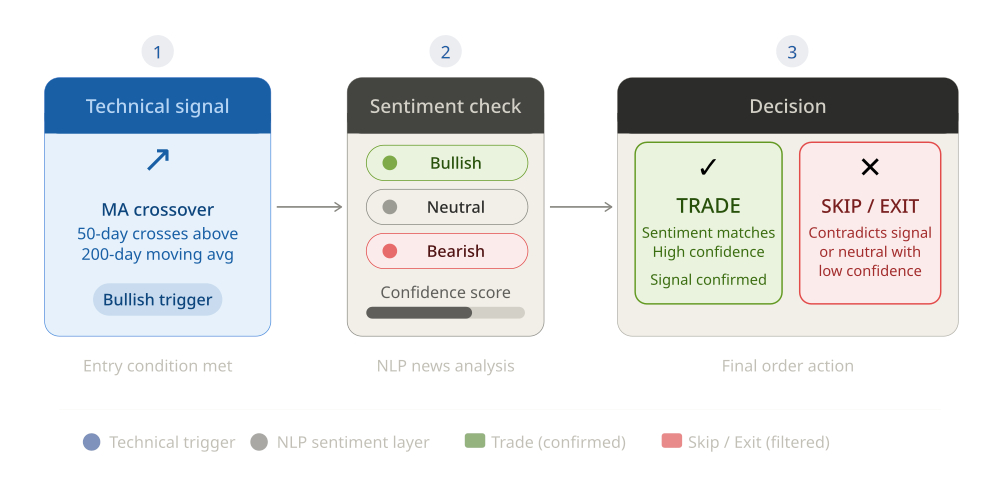 Assume we have an EA that enters long positions when a fast moving average crosses above a slow moving average, and exits when an RSI indicator becomes overbought. Without any sentiment filter, this EA would open a long position every time the moving averages cross, regardless of what the news is saying.
Now, we add the sentiment filter. Let’s say the current sentiment for the instrument is “bearish” with a confidence of 0.85. Even if the moving average crossover condition is satisfied, the EA will not open a long position, because the sentiment does not confirm a bullish bias. The trade is simply skipped. This is especially useful during periods where technical indicators give signals that are contradicted by strong negative news.
Conversely, suppose the EA already holds a long position. The market is moving in our favor, and we are in profit. Suddenly, a major news event occurs, and the sentiment for the instrument flips to “bearish” with a confidence of 0.72. Our EA detects this change and triggers an early exit, even though the RSI is not yet overbought and the technical stop is far away. As a result, we avoid a deeper drawdown that could have happened if the EA had continued to hold the position blindly.
In a different scenario, imagine that the sentiment is “neutral” or has a very low confidence. In this case, most implementations will simply ignore the sentiment for entries and exits, and the EA will trade only on technical signals. This prevents the EA from overreacting to noisy or ambiguous news.
The key point is that the sentiment filter does not replace the core trading logic of the EA. Instead, it acts as an additional layer of confirmation and protection. It helps to:
- Avoid entering trades when the news sentiment clearly contradicts the intended direction.
- Exit positions early when fundamental news starts moving the market against the trade.
- Stay out of the market during periods of high uncertainty or mixed sentiment.
This dual-layer approach is valuable in fast-moving markets: indicators may lag price action, and news-driven volatility can cause large swings quickly. Textual sentiment does not automatically translate into price direction. A “bullish” headline may not push price higher if the market has already priced it in (“buy the rumour, sell the news”). In some cases, participants react nonlinearly (eg, “bad news is good news“). Therefore, treat sentiment analysis as a complementary tool. Combine it with price, volume, liquidity, and macro context (event timing, expectations, positioning) before making trading decisions.
The Implementation: Integration in Expert Advisors
Integrating such a mechanism into an Expert Advisor is pretty straightforward.
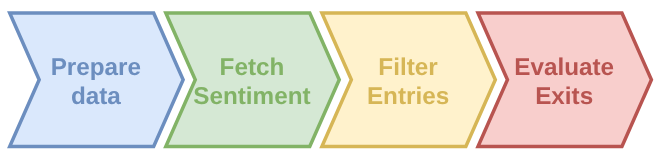 The integration relies on MQL5’s WebRequest function to communicate with a REST API. The API returns a JSON payload containing the current sentiment, which can be “bullish “, “bearish”, or “neutral”, along with a confidence score.
Prepare Data
Initially, we define a structure to store the news sentiment and the necessary data at global level to hold the sentiment information during the EA’s lifetime. We create a SentimentData structure to store the headline text, sentiment prediction amongst “bullish”, “bearish”, or “neutral”, a confidence score ranging from 0.0 to 1.0, and the source of each news item that can be either “live” or “cache”. We also declare a fixed-size array to keep both the current sentiment and a short history of previous news items. We also declare a fixed-size array to keep both the current sentiment and a short history of previous news items. In addition, we define the instrument we want to analyze (e.g. “EURUSD”), the API URL, and the API key. This setup is minimal but sufficient to communicate with the sentiment API and to store the returned data in a structured way.
struct SentimentData {
  string headline;
  string prediction;
  double confidence;
  string source;
};

#define NEWS_ITEM_NUM 10 // this size accommodates both the current news item and historical items
SentimentData sentimentHistory[NEWS_ITEM_NUM];
const string newsInstrument = "EURUSD";
const string apiUrl = "https://trading-sentiment-aggregator-ai.p.rapidapi.com/analyze";
const string apiKey = "your-api-key";
Fetch Sentiment
This step is responsible for actually calling the external API and retrieving the latest sentiment data for the chosen instrument. The API that returns the current sentiment for the instrument we are interested in is called Trading Sentiment Aggregator AI , which is available with a free plan on the RapidAPI portal. This API automatically collects financial news from multiple sources and includes a finance-specialized AI model that instantly predicts whether headlines signal a bullish or bearish market bias, together with a confidence score.
You can call the API for any instrument (forex, indices, stocks, etc.) if it is available in the primary headline source: Yahoo Finance RSS. Sentiment is analyzed on individual headlines, which are processed in English as they become available from the sources. If an instrument’s headline has not changed since the last request, the same headline is returned. A caching mechanism on the API side also ensures fast responses to minimize blocking when calls are made synchronously.
We use MQL5’s WebRequest function to send a POST request to the API, including the instrument name and the number of historical items we want in the response. The API returns a JSON payload which we parse using the JSON Serialization and Deserialization (native MQL) — library for MetaTrader 5 . If the request is successful (HTTP 200), we extract the current sentiment and the optional history array, and we store them in our global sentimentHistory array. We also detect whether a new headline has arrived since the last call, and in that case we print a log message. WebRequest is synchronous. To avoid blocking the EA on every tick, call it at regular intervals via OnTimer (eg, every 4 hours).
bool fetchSentimentData() {
   char postData[], result[];
   string resultHeaders;
   string headers = "Content-Type: application/json\r\n" +
      "x-rapidapi-host: trading-sentiment-aggregator-ai.p.rapidapi.com\r\n" +
      "x-rapidapi-key: " + apiKey + "\r\n";

   CJAVal payload;
   payload["instrument"] = newsInstrument;
   payload["lookback"] = NEWS_ITEM_NUM - 1; // max number of past news we want in addition to the current one
   string jsonPayload = payload.Serialize();

   StringToCharArray(jsonPayload, postData, 0, WHOLE_ARRAY, CP_UTF8);
   ArrayResize(postData, ArraySize(postData) - 1);

   ResetLastError();
   int res = WebRequest("POST", apiUrl, headers, 5000, postData, result, resultHeaders);
   if(res == 200) {
      string responseText = CharArrayToString(result, 0, WHOLE_ARRAY, CP_UTF8);
      CJAVal response;
      if(response.Deserialize(responseText)) {
         string prevHeadline = sentimentHistory[0].headline;

         // reset sentiment history
         for(int i=0; i < ArraySize(sentimentHistory); i++) {
            sentimentHistory[i].headline = "";
            sentimentHistory[i].prediction = "none";
            sentimentHistory[i].confidence = 0.0;
            sentimentHistory[i].source = "";
         }

         // manage current news data
         sentimentHistory[0].headline = response["current"]["headline"].ToStr();
         sentimentHistory[0].prediction = response["current"]["prediction"].ToStr();
         sentimentHistory[0].confidence = response["current"]["confidence"].ToDbl();
         sentimentHistory[0].source = response["current"]["source"].ToStr();

         if(StringCompare(prevHeadline, sentimentHistory[0].headline, false) != 0) {
            Print(__FUNCTION__,
               " > New sentiment: \"", sentimentHistory[0].headline, "\". Prediction=", sentimentHistory[0].prediction, "; confidence=", sentimentHistory[0].confidence, "; source=", sentimentHistory[0].source
            );
         }

         // manage historical news data
         if(response.HasKey("history")) {
            CJAVal historyArray = response["history"];
            int downloadedHistorySize = historyArray.Size();
            int sentimentHistoryArrayIdx = 1;

            for(int i = 0; i < downloadedHistorySize && sentimentHistoryArrayIdx < ArraySize(sentimentHistory); i++, sentimentHistoryArrayIdx++) {
               sentimentHistory[sentimentHistoryArrayIdx].headline = historyArray[i]["headline"].ToStr();
               sentimentHistory[sentimentHistoryArrayIdx].prediction = historyArray[i]["prediction"].ToStr();
               sentimentHistory[sentimentHistoryArrayIdx].confidence = historyArray[i]["confidence"].ToDbl();
               sentimentHistory[sentimentHistoryArrayIdx].source = historyArray[i]["source"].ToStr();
            }
         }

         return true;
      }
   } else {
      Print(__FUNCTION__, " > Could not retrieve sentiment for instrument ", newsInstrument, " (last error: ", GetLastError(), ", http code: ", res, ")");
   }
   return false;
}
A Little Helper Function
To help our EA make buy and sell decisions, we want to provide it with either bullish or bearish news sentiment. Since the downloaded news items can also be neutral, we include a helper function that returns the first meaningful event, if any, or an empty item.
SentimentData getInstrumentSentiment() {
   SentimentData retData = {"", "none", 0.0, ""};

   for(int i = 0; i < ArraySize(sentimentHistory); i++) {
      if(sentimentHistory[i].prediction != "neutral") {
         retData = sentimentHistory[i];
         break;
      }
   }
   return retData;
}
Filter Entries
Once we have the latest sentiment, we can use it as a dynamic filter for trade entries. The idea is simple: even if all the technical conditions for a trade are met (e.g. moving average crossover, indicator signals), the trade will only be executed if the current sentiment is consistent with the intended direction and has sufficient confidence. This way the sentiment data acts as the final green light. For example, for a buy order, we require the sentiment to be “bullish” with a confidence above a certain threshold (e.g. 0.7 ). For a sell order, we require “bearish” with a similar minimum confidence. This mechanism prevents the EA from entering trades when the news sentiment clearly contradicts the technical signal, which can be especially useful during major news events or sudden market shifts.
bool buyCondition = true; // <-- placeholder for your strategy
const double minConfidence = 0.7;
SentimentData sentiment = getInstrumentSentiment();
bool newsSentimentOk = (sentiment.prediction == "bullish" && sentiment.confidence >= minConfidence);

if(buyCondition && newsSentimentOk) {
   // Proceed with the trade
}
Evaluate Exits
Determining the right time to close positions is one of the most challenging tasks in trading, whether manual or automated. The same sentiment data can also be used to improve how we exit positions. Instead of relying only on fixed take-profit and stop-loss levels or purely technical exit signals, we can close an existing position if the sentiment flips against the current trade. For example, if we are long and the sentiment suddenly becomes strongly bearish, we can exit early to limit potential losses. Conversely, if we are short and sentiment becomes strongly bullish, we can close the short position. This approach helps to protect profits and reduce drawdowns when fundamental news starts to move the market in the opposite direction of the trade. The sentiment for exits is evaluated using a separate function that checks for a “sentiment reversal” relative to the current position type.
Here is how such a function could look.
bool determineSentimentReversal() {
   SentimentData currentSentiment = getInstrumentSentiment();
   if(currentSentiment.prediction == "none" || currentSentiment.prediction == "neutral") {
      return false;
   }

   ulong tkt = 0;
   bool positionExists = false;
   for(int i = PositionsTotal() - 1; i >= 0; i--) {
      tkt = PositionGetTicket(i);
      if(tkt > 0 && PositionGetInteger(POSITION_MAGIC) == magicNumber && PositionGetString(POSITION_SYMBOL) == _Symbol) {
         positionExists = true;
         break;
      }
   }
   if(!positionExists) return false;

   const double minConfidenceReversal = 0.55;

   bool isLong = (PositionGetInteger(POSITION_TYPE) == POSITION_TYPE_BUY);
   bool isBearishReversal = (isLong && currentSentiment.prediction == "bearish" && currentSentiment.confidence >= minConfidenceReversal);
   bool isBullishReversal = (!isLong && currentSentiment.prediction == "bullish" && currentSentiment.confidence >= minConfidenceReversal);
   return (isBearishReversal || isBullishReversal);
}
This function is easily used like this:
bool exitCondition = true; // <-- placeholder for your strategy
bool isSentimentReversal = determineSentimentReversal();

if(exitCondition && isSentimentReversal) {
   // Exit trade
}
Example EA
Now let’s take a look at a working instance. As an example, we put all of the above into a very basic EA using a Simple Moving Average crossover as the entry signal and a RSI oscillator as exit signal. Both entry and exit signals are coupled with the current news sentiment as an additional criterion.
//+------------------------------------------------------------------+
//|                                  Example EA - News Sentiment.mq5 |
//+------------------------------------------------------------------+
#define VERSION "1.00"
#property version VERSION
#property strict

#include <Trade/Trade.mqh>
#include <Indicators/Oscilators.mqh>
#include <JAson.mqh>

//+------------------------------------------------------------------+
//| Input parameters                                                 |
//+------------------------------------------------------------------+
input group "<--- Trade Management --->";
input double inpLots = 0.1;                            // Lots
input int maFastLen = 20;                              // Length of Fast SMA
input int maSlowLen = 40;                              // Length of Slow SMA

input group "<--- Profit Management --->";
input double tpPricePerc = 0.0;                        // TP Price % (0: disabled)
input int rsiPeriod = 7;                               // RSI Period (0: disabled)
input int rsiOverbought = 80;                          // RSI Overbought
input int rsiOversold = 20;                            // RSI Oversold

input group "<--- Risk Management --->";
input double slPricePerc = 1.0;                        // SL Price % (0: disabled)

input group "<--- Sentiment Settings --->";
input string sentimentInstrument = "";                 // Sentiment Instrument (empty: disabled)
input ENUM_TIMEFRAMES sentimentUpdateFreq = PERIOD_H4; // Sentiment Update Frequency
input double minConfSentEntry = 0.7;                   // Min. Confidence for Sentiment Entry
input double minConfSentExit = 0.5;                    // Min. Confidence for Sentiment Exit

input group "<--- Other Settings --->";
input ulong magicNumber = 0;                           // Magic Number

//+------------------------------------------------------------------+
//| Globals                                                          |
//+------------------------------------------------------------------+
CTrade trade;

//--- SMA variables
int hFast = INVALID_HANDLE, hSlow = INVALID_HANDLE;
double maFasts[], maSlows[];

//--- RSI indicator providing exit signals
CiRSI rsi;

//--- data for news sentiment
struct SentimentData {
  string headline;
  string prediction;
  double confidence;
  string source;
};
#define NEWS_ITEM_NUM 10
SentimentData sentimentHistory[NEWS_ITEM_NUM];

const string apiUrl = "https://trading-sentiment-aggregator-ai.p.rapidapi.com/analyze";
const string apiKey = "your-api-key"; // Note: protect your API key. Keeping it in source code is not a good security practice

//+------------------------------------------------------------------+
//| Expert initialization function                                   |
//+------------------------------------------------------------------+
int OnInit() {
  trade.SetExpertMagicNumber(magicNumber);

  hFast = iMA(_Symbol, PERIOD_CURRENT, maFastLen, 0, MODE_SMA, PRICE_CLOSE);
  if(hFast == INVALID_HANDLE){
    Print(__FUNCTION__, " > Could not initialize Fast SMA");
    return INIT_FAILED;
  }

  hSlow = iMA(_Symbol, PERIOD_CURRENT, maSlowLen, 0, MODE_SMA, PRICE_CLOSE);
  if(hSlow == INVALID_HANDLE){
    Print(__FUNCTION__, " > Could not initialize Slow SMA");
    return INIT_FAILED;
  }

  if(rsiPeriod > 0) {
    if(!rsi.Create(_Symbol, PERIOD_CURRENT, rsiPeriod, PRICE_CLOSE)) {
      Print(__FUNCTION__, " > Could not initialize RSI indicator");
      return INIT_FAILED;
    }
  }

  ArraySetAsSeries(maFasts, true);
  ArraySetAsSeries(maSlows, true);

  if(StringLen(sentimentInstrument) > 0 && !MQLInfoInteger(MQL_TESTER)) {
    int timerSeconds = PeriodSeconds(sentimentUpdateFreq);
    EventSetTimer(timerSeconds);
    fetchSentimentData();
  }

  return(INIT_SUCCEEDED);
}

//+------------------------------------------------------------------+
//| Expert deinitialization function                                 |
//+------------------------------------------------------------------+
void OnDeinit(const int reason) {
  if(hFast != INVALID_HANDLE) {
    IndicatorRelease(hFast);
    hFast = INVALID_HANDLE;
  }

  if(hSlow != INVALID_HANDLE) {
    IndicatorRelease(hSlow);
    hSlow = INVALID_HANDLE;
  }

  if(rsiPeriod > 0) rsi.FullRelease(true);

  ArrayFree(maFasts);
  ArrayFree(maSlows);

  if(StringLen(sentimentInstrument) > 0 && !MQLInfoInteger(MQL_TESTER)) EventKillTimer();
}

//+------------------------------------------------------------------+
//| Expert OnTimer function                                          |
//+------------------------------------------------------------------+
void OnTimer() {
  if(!MQLInfoInteger(MQL_TESTER)) fetchSentimentData();
}

//+------------------------------------------------------------------+
//| Expert tick function                                             |
//+------------------------------------------------------------------+
void OnTick() {
  //--- run logic each 1-min bar
  static datetime lastBarTime = 0;
  datetime curBarTime = iTime(_Symbol, PERIOD_M1, 0);
  if(lastBarTime != curBarTime) {
    lastBarTime = curBarTime;
    return;
  }

  if(positionsTotal() <= 0) { // currently not trading. Manage entry
    //--- determine entry conditions
    bool longCondition = false, shortCondition = false;
    if(CopyBuffer(hFast, 0, 0, maFastLen, maFasts) != -1 && CopyBuffer(hSlow, 0, 0, maSlowLen, maSlows) != -1) {
      longCondition = crossover(maFasts, maSlows);
      shortCondition = crossunder(maFasts, maSlows);
    }

    //--- get latest sentiment for configured instrument
    SentimentData curSentiment =  {"", "none", 0.0, ""};
    if(StringLen(sentimentInstrument) > 0) {
      curSentiment = getInstrumentSentiment();
    }
    bool newsSentimentOk = true;

    if(longCondition) {
      double ask = SymbolInfoDouble(_Symbol, SYMBOL_ASK);
      double slPrice = slPricePerc > 0 ? NormalizeDouble(ask - ask * (slPricePerc / 100), _Digits) : 0;
      double tpPrice = tpPricePerc > 0 ? NormalizeDouble(ask + ask * (tpPricePerc / 100), _Digits) : 0;
      if(!MQLInfoInteger(MQL_TESTER) && StringLen(sentimentInstrument)) {
        newsSentimentOk = curSentiment.prediction == "bullish" && curSentiment.confidence >= minConfSentEntry;
      }
      if(newsSentimentOk) trade.Buy(inpLots, _Symbol, ask, slPrice, tpPrice);
    } else if(shortCondition) {
      double bid = SymbolInfoDouble(_Symbol, SYMBOL_BID);
      double slPrice = slPricePerc > 0 ? NormalizeDouble(bid + bid * (slPricePerc / 100), _Digits) : 0;
      double tpPrice = tpPricePerc > 0 ? NormalizeDouble(bid - bid * (tpPricePerc / 100), _Digits) : 0;
      if(!MQLInfoInteger(MQL_TESTER) && StringLen(sentimentInstrument)) {
        newsSentimentOk = curSentiment.prediction == "bearish" && curSentiment.confidence >= minConfSentEntry;
      }
      if(newsSentimentOk) trade.Sell(inpLots, _Symbol, bid, slPrice, tpPrice);
    }
   } else { // currently trading. Manage exit
    //--- determine exit conditions for RSI-based TP
    if(rsiPeriod > 0) {
      rsi.Refresh();
      bool exitLongCond = rsi.Main(0) > rsiOverbought;
      bool exitShortCond = rsi.Main(0) < rsiOversold;

      for(int i = PositionsTotal() - 1; i >= 0; i--) {
        ulong tkt = PositionGetTicket(i);
        if(tkt > 0 && PositionGetInteger(POSITION_MAGIC) == magicNumber && PositionGetString(POSITION_SYMBOL) == _Symbol) {
          if(PositionGetDouble(POSITION_PROFIT) > 0.0) {
            if(exitLongCond || exitShortCond) {
              closeOpenPositions();
              return;
            }
          }
        }
      }
    }

    if(StringLen(sentimentInstrument) > 0) {
      if(determineSentimentReversal()) {
        closeOpenPositions();
      }
    }
  }
}

//+------------------------------------------------------------------+
//| Count EA's positions                                             |
//+------------------------------------------------------------------+
int positionsTotal() {
  int totalPos = 0;
  for(int i = PositionsTotal() - 1; i >= 0; i--) {
    if(PositionGetTicket(i) != 0) {
      if(PositionGetInteger(POSITION_MAGIC) == magicNumber && PositionGetString(POSITION_SYMBOL) == _Symbol) totalPos++;
    }
  }
  return totalPos;
}

//+-------------------------------------------------------------------+
//|  Close all EA's positions                                         |
//+-------------------------------------------------------------------+
void closeOpenPositions() {
  CTrade trd;
  for(int i = PositionsTotal()-1; i >= 0; i--) {
    ulong ticket = PositionGetTicket(i);
    if(ticket > 0) {
      if(PositionGetInteger(POSITION_MAGIC) == magicNumber && PositionGetString(POSITION_SYMBOL) == _Symbol) {
        trd.SetExpertMagicNumber(magicNumber);
        trd.PositionClose(ticket);
      }
    }
  }
}

//+----------------------------------------------------------------------+
//| Determine whether a crossover happened between two series of values  |
//+----------------------------------------------------------------------+
bool crossover(const double &series1[], const double &series2[]) {
  if(ArraySize(series1) < 2 || ArraySize(series2) < 2) return false;
  return series1[ArraySize(series1) - 1] > series2[ArraySize(series2) - 1] &&
    series1[ArraySize(series1) - 2] < series2[ArraySize(series2) - 2];
}

//+----------------------------------------------------------------------+
//| Determine whether a crossunder happened between two series of values |
//+----------------------------------------------------------------------+
bool crossunder(const double &series1[], const double &series2[]) {
  if(ArraySize(series1) < 2 || ArraySize(series2) < 2) return false;
  return series1[ArraySize(series1) - 1] < series2[ArraySize(series2) - 1] &&
    series1[ArraySize(series1) - 2] > series2[ArraySize(series2) - 2];
}

//+------------------------------------------------------------------+
//| Get news sentiment data                                          |
//+------------------------------------------------------------------+
bool fetchSentimentData() {
  char postData[], result[];
  string resultHeaders;
  string headers = "Content-Type: application/json\r\n" +
    "x-rapidapi-host: trading-sentiment-aggregator-ai.p.rapidapi.com\r\n" +
    "x-rapidapi-key: " + apiKey + "\r\n";

  CJAVal payload;
  payload["instrument"] = sentimentInstrument;
  payload["lookback"] = NEWS_ITEM_NUM - 1; // max number of past news we want in addition to the current one
  string jsonPayload = payload.Serialize();

  StringToCharArray(jsonPayload, postData, 0, WHOLE_ARRAY, CP_UTF8);
  ArrayResize(postData, ArraySize(postData) - 1);

  ResetLastError();
  int res = WebRequest("POST", apiUrl, headers, 5000, postData, result, resultHeaders);
  if(res == 200) {
    string responseText = CharArrayToString(result, 0, WHOLE_ARRAY, CP_UTF8);
    CJAVal response;
    if(response.Deserialize(responseText)) {
      string prevHeadline = sentimentHistory[0].headline;

      //--- reset sentiment history
      for(int i=0; i < ArraySize(sentimentHistory); i++) {
        sentimentHistory[i].headline = "";
        sentimentHistory[i].prediction = "none";
        sentimentHistory[i].confidence = 0.0;
        sentimentHistory[i].source = "";
      }

      //--- manage current news data
      sentimentHistory[0].headline = response["current"]["headline"].ToStr();
      sentimentHistory[0].prediction = response["current"]["prediction"].ToStr();
      sentimentHistory[0].confidence = response["current"]["confidence"].ToDbl();
      sentimentHistory[0].source = response["current"]["source"].ToStr();

      if(prevHeadline != sentimentHistory[0].headline) {
        Print(__FUNCTION__,
          " > New sentiment: \"", sentimentHistory[0].headline, "\". Prediction=", sentimentHistory[0].prediction, "; confidence=", sentimentHistory[0].confidence, "; source=", sentimentHistory[0].source
        );
      }

      //--- manage historical news data
      if(response.HasKey("history")) {
        CJAVal historyArray = response["history"];
        int downloadedHistorySize = historyArray.Size();
        int sentimentHistoryArrayIdx = 1;

        for(int i = 0; i < downloadedHistorySize && sentimentHistoryArrayIdx < ArraySize(sentimentHistory); i++, sentimentHistoryArrayIdx++) {
          sentimentHistory[sentimentHistoryArrayIdx].headline = historyArray[i]["headline"].ToStr();
          sentimentHistory[sentimentHistoryArrayIdx].prediction = historyArray[i]["prediction"].ToStr();
          sentimentHistory[sentimentHistoryArrayIdx].confidence = historyArray[i]["confidence"].ToDbl();
          sentimentHistory[sentimentHistoryArrayIdx].source = historyArray[i]["source"].ToStr();
        }
      }
      return true;
    }
   } else {
    Print(__FUNCTION__, " > Could not retrieve sentiment for instrument ", sentimentInstrument, " (last error: ", GetLastError(), ", http code: ", res, ")");
   }
  return false;
}

//+------------------------------------------------------------------+
//|  Get the first meaningful item from the sentiment array, if any  |
//+------------------------------------------------------------------+
SentimentData getInstrumentSentiment() {
  SentimentData retData = {"", "none", 0.0, ""};

  for(int i = 0; i < ArraySize(sentimentHistory); i++) { // loop starts from the first element which contains the current news item
    if(sentimentHistory[i].prediction != "neutral") {
      retData = sentimentHistory[i];
      break;
    }
  }
  return retData;
}

//+---------------------------------------------------------------------------------+
//| Check if the latest sentiment direction is mismatching the current position     |
//+---------------------------------------------------------------------------------+
bool determineSentimentReversal() {
  SentimentData currentSentiment = getInstrumentSentiment();
  if(currentSentiment.prediction == "none" || currentSentiment.prediction == "neutral") {
  return false;
  }

   //--- select position currently open by this EA, if any
   ulong tkt = 0;
   bool positionExists = false;
   for(int i = PositionsTotal() - 1; i >= 0; i--) {
    tkt = PositionGetTicket(i);
    if(tkt > 0 && PositionGetInteger(POSITION_MAGIC) == magicNumber && PositionGetString(POSITION_SYMBOL) == _Symbol) {
      positionExists = true;
      break;
    }
  }
  if(!positionExists) return false;

  bool isLong = (PositionGetInteger(POSITION_TYPE) == POSITION_TYPE_BUY);
  bool isBearishReversal = (isLong && currentSentiment.prediction == "bearish" && currentSentiment.confidence >= minConfSentExit);
  bool isBullishReversal = (!isLong && currentSentiment.prediction == "bullish" && currentSentiment.confidence >= minConfSentExit);
  return (isBearishReversal || isBullishReversal);
}
Please note that this EA is provided for educational purpose only and is not production-ready.
Common pitfalls and tips
When integrating the sentiment filter into your own Expert Advisor, there are several common pitfalls and practical tips that can save you time and avoid unexpected behavior.
Make sure the sentiment instrument is correctly set
In the example EA above, the input sentimentInstrument determines which instrument’s sentiment the API will analyze. According to the Trading Sentiment Aggregator AI documentation, Yahoo Finance’s RSS feed is one of the sources used for headlines. To ensure you set the correct instrument, open in your browser the URL https: //feeds.finance.yahoo.com/rss/2.0/headline?s=“INSTRUMENT”®ion=US&lang=en-US
replacing “INSTRUMENT” with your instrument. For example:
https://feeds.finance.yahoo.com/rss/2.0/headline?s=EURUSD=X®ion=US&lang=en-US
This verifies that EURUSD exists in the Yahoo Finance RSS feed and will be handled by the sentiment API.
Which instrument to use depends on the pair you’re trading, and the response from this URL also lets you double-check that the general topic of the headlines is suitable for your strategy. For example, if you’re trading the Forex pair USDJPY you can set the full symbol as your instrument or use only the base currency (in this case “USD”), provided it exists on Yahoo Finance. You can search for your instrument and check whether it’s supported here: https://finance.yahoo.com/lookup/
Alternatively, in the example EA you can disable the sentiment filter altogether by leaving the input sentimentInstrument empty ( “”).
Choose a reasonable sentiment update frequency
The sentimentUpdateFreq parameter controls how often the EA calls the sentiment API. Using a very short frequency (for example M1 or M5) can lead to:
- Too many API calls, quickly exhausting the free tier on RapidAPI.
- Unnecessary network traffic without adding much value, since sentiment may not change that fast.
In the example EA, we call the API every 4 hours using OnTimer, which is a good balance between responsiveness and cost.
Understand how the WebRequest function behaves in the Strategy Tester
As per WebRequest documentation, this function cannot execute inside the MetaTrader 5 Strategy Tester. Consequently:
- The sentiment filter won’t work during backtests.
- The example EA will trade only on technical signals when run in the tester, ignoring sentiment.
- Metrics observed in the tester therefore do not reflect the combined (technical + sentiment) strategy and cannot alone validate sentiment-driven improvements.
To allow repeatable, scientific testing (walk‑forward, Monte Carlo, out‑of‑sample) you need to simulate the API interaction inside the tester. Below are some practical options to create a deterministic “historical sentiment feed” the EA running inside the tester can read.
Proxy / recorded feed (recommended)
- During a forward test, record actual API responses to a file (CSV or JSON). Include timestamps, instrument, sentiment score/direction, and any metadata the EA uses.
- In the tester, modify the EA to read that file and return the recorded sentiment value for the corresponding bar/time instead of calling WebRequest. This approach recreates real API behavior and preserves timing; it also lets you replay identical scenarios for walk‑forward and Monte Carlo tests (by shuffling or sampling the recorded events).
Manual feed
- Create a text/CSV file manually with synthetic sentiment events, e.g., one row per timestamp: YYYY‑MM‑DD HH:MM, instrument, sentiment_score, sentiment_label.
- Use this file to stress‑test the EA under controlled conditions (extreme bullish/bearish sequences, mixed signals, sparse news). This option is useful for sensitivity analysis and edge cases where you want precise control over the input stream.
Curl-driven snapshotting
Use a script (Bash, Python, PowerShell, etc.) with Curl to call the API a number of times and append responses to a file:
curl --request POST \
        --url https://trading-sentiment-aggregator-ai.p.rapidapi.com/analyze \
        --header 'Content-Type: application/json' \
        --header 'x-rapidapi-host: trading-sentiment-aggregator-ai.p.rapidapi.com' \
        --header 'x-rapidapi-key: <your-api-key>' \
        --data '{"instrument":"USD","lookback": 10}'
Call the API from the script at desired times to collect recent headlines along with sentiment analysis and save relevant fields and timestamps to CSV/JSON for later playback in the tester. This quickly builds a larger, realistic dataset without live trading.
To integrate one of these options you will add a configuration flag in the EA like, e.g., sentimentMode = LIVE|CACHE. When in CACHE mode, the EA reads sentiment values from the local file and ignores WebRequest.
Practical tips for reliable testing
- Include timestamps and instrument identifiers in the saved feed to avoid misalignment across time zones, symbol conventions, or daylight‑saving shifts.
- Record additional context (headline text, volume of headlines, API call success/failure) to reproduce edge cases and debug discrepancies.
- For statistical significance, run out‑of‑sample and walk‑forward tests using multiple recorded periods; for Monte Carlo, randomly sample or block‑shuffle recorded events while preserving intraday order if needed.
- Before relying on live trading, validate the cached‑feed behavior in forward testing on a demo account and compare live decisions to cached replays to detect implementation errors.
By adding a simple recording and playback layer you preserve the ability to test sentiment‑augmented strategies scientifically and reproducibly, while keeping live WebRequest only for demonstration or production runs.
Tune confidence thresholds carefully
The parameters minConfSentEntry and minConfSentExit control how strong the sentiment must be to affect entries and exits.
- If you set minConfSentEntry too high (for example 0.9), the EA may rarely enter trades, even when the technical signal is strong.
- If you set minConfSentExit too low (for example 0.3), the EA may exit too easily on noisy or weak sentiment signals.
Start with moderate values (for example 0.6–0.7 for entries, 0.5–0.6 for exits) and adjust based on how the EA behaves in real market conditions.
Protect your API key
In the example code, the API key is stored directly in the source as:
const string apiKey = "your-api-key";
This is acceptable for learning and testing, but not recommended for production or distribution. In a real EA, you should:
- Store the API key outside the source code (for example in a configuration file or environment variable).
- Retrieve the key from a server at runtime after authentication and authorization.
- Avoid sharing the source code with the key embedded (e.g. on a remote git repository).
Don’t overfit your strategy to sentiment
Also keep in mind that sentiment is a probabilistic signal, not a deterministic predictor. Avoid:
- Trying to optimize your strategy to “perfectly match” sentiment signals.
- Expecting the sentiment filter to work perfectly on every single trade.
Instead, evaluate the performance statistically over time and across many trades. The goal is to improve the overall risk-adjusted return, not to eliminate every loss.
Wrap up
By integrating a mechanism to get the current sentiment of the instrument the EA trades, we move beyond pure price action and technical analysis by incorporating the fundamental drivers of the market. This dual-layer approach helps avoid false entries and premature exits during fundamental shifts and provides an intelligent filter mechanism that technical indicators often miss.
Important Notes
- To use this feature in one of your EAs, you must add the URL https://trading-sentiment-aggregator-ai.p.rapidapi.com/ to the list of allowed WebRequest URLs in the MT5 terminal under Tools > Options > Expert Advisors.
- User Responsibility: Information in this article must be considered a decision-support tool, not financial advice. The final responsibility for any trading or investment decision remains entirely with the user. We strongly recommend using this data as one of several inputs within a robust risk management strategy.
Disclaimer on Artificial Intelligence
- The API used in this article is based on an AI model for finance and must be used responsibly.
- Probabilistic Nature: The model uses statistics to categorize market sentiment with the results being probabilistic, not deterministic. AI models predict patterns based on language and do not represent absolute market truth.
- Potential for Misinterpretation: AI models can occasionally produce hallucinations by misreading complex financial jargon, irony, or localized market context. While they strive for high accuracy, individual data points may still contain errors.
- Trading Logic: Users should approach these results with a probabilistic mindset, which is common in professional trading. This means evaluating performance over time rather than relying on a single AI prediction.